The VITURE Beast XR Glasses Completely Blew Me Away
Every now and again a device makes you feel like you've leapt into the future. These glasses did exactly that, even if the journey wasn't entirely smooth.
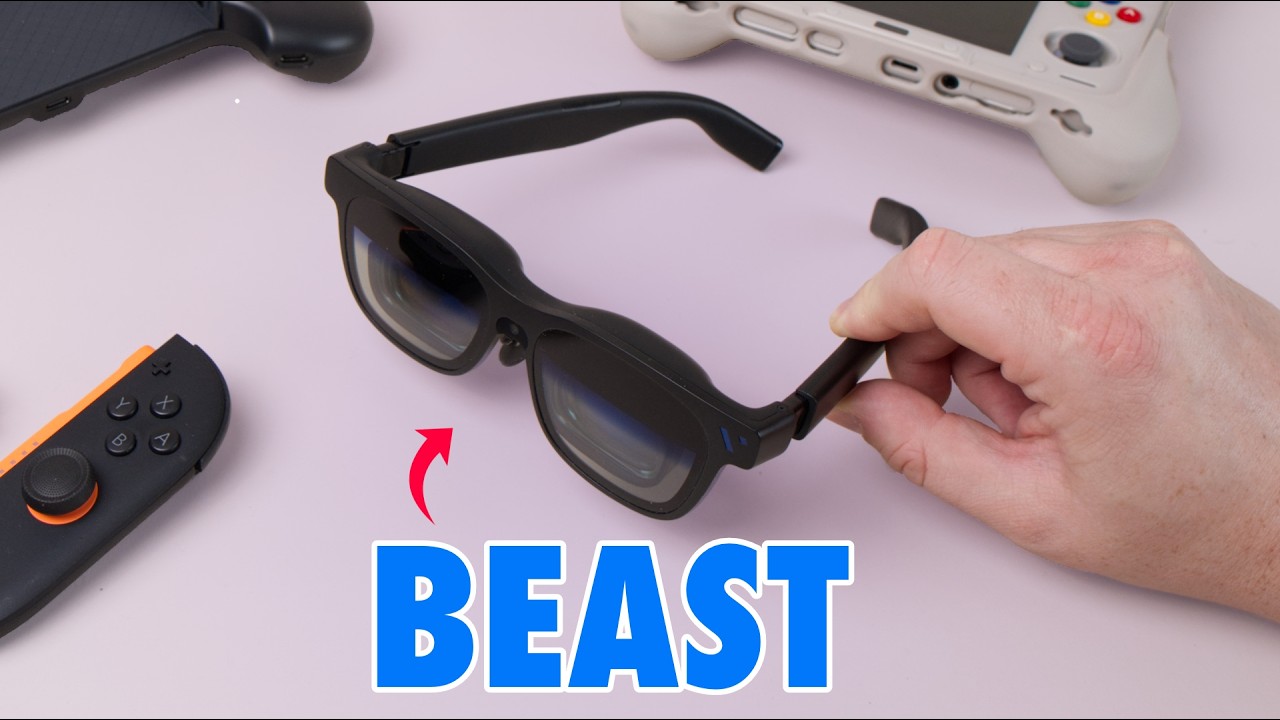
A Leap Into the Future
Every now and again, a device comes along that makes you feel like you’ve jumped forward in time. That’s exactly what happened when I first put on the VITURE Beast XR glasses. It hasn’t been completely smooth sailing since VITURE sent me a pair about a month ago, and I’ll get to the issues I ran into, but these are incredible.
Behind the facade of a regular (if slightly bulky) pair of shades sit two stunning Sony displays. Together they give you a 174-inch virtual screen with a 58° field of view, 1250 nits of brightness, superb colour accuracy and great sharpness in the centre of your focus. I put it that way because the sharpness doesn’t extend to the periphery. If you’re buying these primarily for productivity, that might disappoint you. It’s deliberate, though, since it mimics the way your eye focuses on what’s directly in front of you, and it makes the glasses absolutely brilliant for gaming and watching films.
If you’re running a demanding game at low to medium settings, you will notice aliasing once the image is blown up this big, but the immersion is worth it. Playing a first-person game like Indiana Jones and the Great Circle feels like being on the verge of a VR headset without going to that full extreme. The Harman-tuned open speakers in the frames add to the effect, and because they’re open, you don’t feel completely shut off from the world around you.
Comfort, Fit and Prescription Lenses
For all the technology packed inside, the Beast XR weighs just 88g, which isn’t much more than a standard pair of glasses. The aluminium frame feels great and gets warm above the right eyebrow, but never enough to become uncomfortable. You get a few different nose pads in the box so you can find your size. I haven’t found my perfect fit, and after extended sessions the frames press on my nose bridge and leave small red marks.
You may also need to fiddle with positioning to get the best view, especially with the prescription lens inserts, which can create a white reflection along the bottom of the lens if they’re not seated properly. Even so, being able to order inserts tailored to your prescription is a huge plus. Other brands have tried built-in lenses, but I think inserts are the right answer, because our eyesight changes. In two or three years I can order a new pair to match a new prescription and keep everything looking this sharp.
Another smart choice is the way the cable tapers around the right side of your ear and stays out of the way. As long as your device is on your right, you’ll barely notice it. There’s even a neckband accessory for a more wire-free setup.
So Many Modes, So Little Time
The Beast XR didn’t launch with its full feature set, but the firmware updates have been steady, and nearly everything is now available. Some of it is genuinely cool. The right stalk and the home menu on the left give you a lot of control:
- Display modes: Switch between a fixed screen, a smart follow mode that gradually drifts with your head, and an anchor mode that pins the screen in place. I use anchor most often, because it lets me look around the room, and if I point the glasses at a bright light the display dims so I can read another device. Anchor does crop the image in large-screen mode, so I use smart follow for gaming and films. Fixed mode would suit a train, where you want to limit stutter and motion blur.
- Tint control: You can let more of the outside world through the lenses. Most of the time I keep it at maximum darkness for that cinema feel, but at the brightest setting you could trace an image on paper.
- Home menu: Pick between 60Hz and 120Hz, an ultra-wide mode that curves around your head, a side mode that parks a smaller screen in one quadrant, and a 3D mode.
- Screen distance: There’s an option to change how far away the screen appears, but I barely noticed it do anything, so that’s one area VITURE should work on.
Spacewalker and the Joy of 3D
At first I had little use for the 3D mode, because there isn’t much 3D content around, even on streaming services, which often only store the 2D version. If you want to make the most of it, install the Spacewalker app, which is available on nearly every platform. The coolest thing I did was go back to spatial videos I’d taken of my son when he was two, and that was one of the moments in testing that absolutely blew my mind.
Spacewalker is useful well beyond that. On an iPhone it’s a slightly odd experience to log into an Android front end, but it gives you access to launchers for services like Xbox Game Pass and Nvidia GeForce, and you can use your phone as a trackpad or a pointer. Depending on your region, some streaming services are blocked on the glasses because of DMCA restrictions, so you have to reach them through the Spacewalker browser instead. In the UK, that includes BBC iPlayer. It also extends things when you connect a computer, with far more flexibility for setting up ultra-wide monitors.
One Cable, a Few Caveats
The beauty of where these glasses are at is that most devices work with a genuine one-cable setup. I’ve plugged mine into my Steam Deck, my Legion Go S and various Android handhelds. The Nintendo Switch 2 is trickier, as it’s notoriously hostile to third-party displays and docks. VITURE seem to be in an ongoing battle with it, needing several firmware updates to keep compatibility. The original dock they sent didn’t work with the Switch 2 at all because it came from an earlier batch, although the replacement works perfectly. If you buy one, get a brand new dock rather than hunting on eBay, since older versions may not be compatible.
Anything you plug into the glasses loses battery at a scary rate, so the dock is worth having anyway. It includes a clip that snaps onto the back of the Switch 2 and acts as a battery pack, with a short USB-C cable to connect them. That does remove the kickstand, but if you’re happy laying the console flat, using the Joy-Cons with the glasses is a great experience, and it’s another step closer to a VR headset. The dock also has an HDMI input, which I’ve been enjoying with my Analogue 3D for old N64 games. I’d treat it as the first accessory to consider.
For mobile gaming, you could also pick up the abxylute S9V, a phone controller a lot like the GameSir G8 Galileo that connects over USB-C. It feels premium, has high-quality buttons, is comfortable and light, and lets you lift off the magnetic faceplates and swap the D-pad for two shield options included in the pack.
Final Thoughts
It’s honestly overwhelming to dig into every feature, but the crux is that these glasses feel like a genuine leap forward and have been fun in so many ways. Most of my time has gone on gaming. I love them with my Legion Go S, because its two USB-C ports let me plug one into power and the other into the glasses, and playing something like Indiana Jones that way is incredible. They’re absolutely boss for watching football too, even if Liverpool have been pretty terrible this season, and if you’re mainly buying them to watch films on the train, you won’t be disappointed.
For productivity, the blur around the periphery is a limiting factor, and other glasses may suit long working sessions better, though they’ve been pretty good for editing photos. All in all, the Beast is for entertainment, and it’s the closest I’ve come to truly replacing my TV for solo viewing.
My recommendation: If you want a big, immersive screen for gaming, films and football, the Beast XR is superb and well worth it. If your main goal is extended productivity work, look elsewhere, because the soft edges will get in the way.