JSAUX's E-Ink Faceplate for Steam Machine is Kind of a Mess...
I was so excited to get my hands on this. It pains me to say that, at least in its current state, I simply can't recommend it.
A Nice Idea, Built on Open Specs
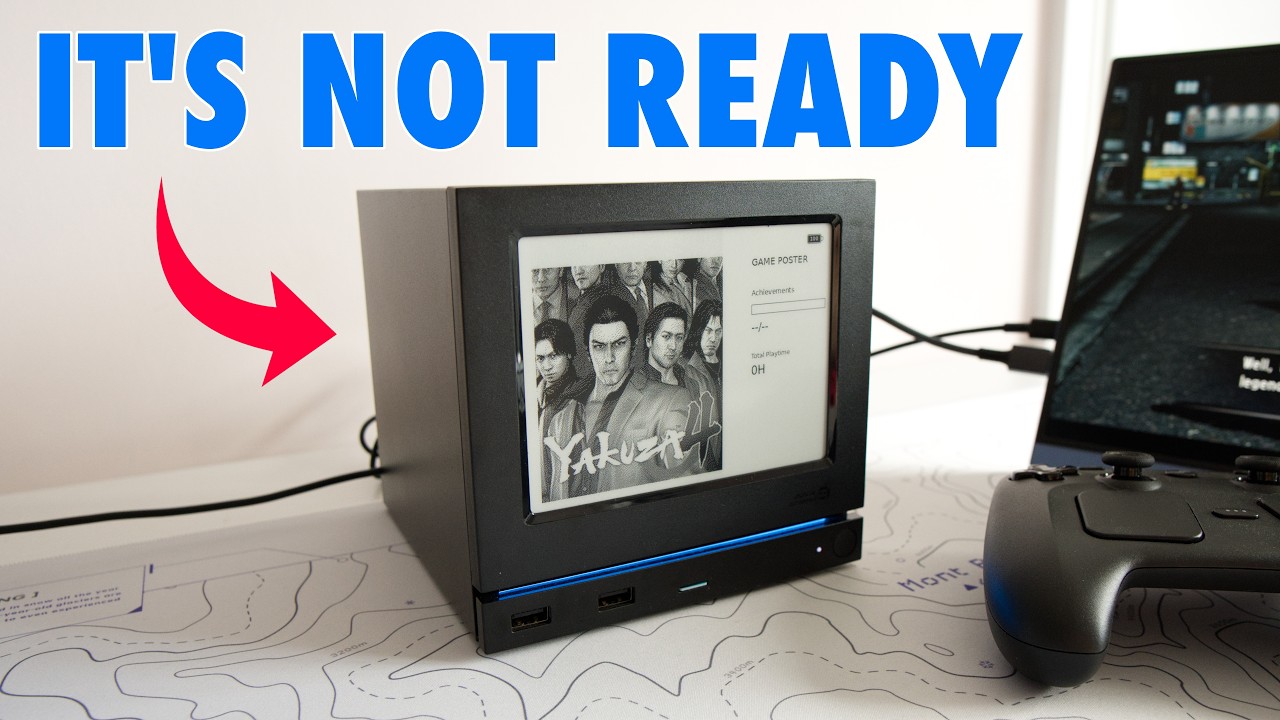
I was so excited to get my hands on this e-ink faceplate for the Steam Machine. It pains me to say that, at least in its current state, I simply can’t recommend it, and I want to tell you exactly why. One of the genuinely cool things Valve did with the Steam Machine was share its specs so people and companies could design their own faceplates and accessories. JSAUX aren’t the first to make an e-ink display for it. Plenty of tinkerers have already put their own designs up on places like Reddit, but JSAUX is the first company to actually ship one you can buy from an online store, at around $99.
JSAUX have sent me products in the past, but I bought this one with my own money. From a hardware point of view, it’s genuinely impressive. It’s a 5.83-inch e-ink panel that magnetically attaches to the front of your Steam Machine, with a resolution of 640x480 that displays sharp, crisp images. It takes an hour or two to charge and gets you around 22 hours of runtime, and it comes with a short USB-A to USB-C cable so you can plug it straight into the front of the console to top it up. You get that kind of longevity from a 500mAh battery because there’s no backlight, which makes it great during the day but means you’ll barely see it in the evening, especially from a couch some distance from your TV. That’s the first hint that this display isn’t really built with gamers in mind. I think it’s much more useful as a productivity tool, if you’re using your Steam Machine to code.
Software Is Where It Falls Apart
There are a few other hardware niggles, which I’ll come back to, but the real problem is the software. When I was testing it, there were several times I couldn’t work out why it had stopped working, and there’s no way to reset it, so you’re entirely reliant on the software, which leaves a lot to be desired.
The first warning sign is that it depends on a Decky Loader plugin to work. Decky Loader lets you install plugins on your Steam Machine or Steam Deck for custom functions, which can be useful but also frustrating. Setting it up isn’t simple. If you’re not comfortable going into desktop mode, installing Decky Loader from GitHub, and working through JSAUX’s setup steps, this isn’t for you. The bigger issue is that every time the Steam Machine updates itself, it breaks the Decky Loader connection to the panel. In the few days I tested it, I had to reinstall the JSAUX plugin about three times because it kept losing its connection to the faceplate. That’s especially frustrating because it’s an always-on display, and whatever state it’s in when you switch off the Steam Machine is what it stays showing until you turn it back on.
Features That Don’t Quite Work
That matters because this display isn’t just meant to show images you upload to a folder. It’s supposed to surface rich information about the games you’re playing, along with things like the weather and the time. As a gamer, the feature I was most interested in was game time, which can show a poster of the game you’re playing alongside your total and session playtime. There are two views: a stopwatch-style one, which is fine, and a poster mode showing the game art, which is the one I actually wanted. For some reason, despite presumably pulling from the same API, the poster mode doesn’t display the correct total playtime. It’s strange that the system shows the right information in some views and not others. And since the last view locks in place when you switch off the Steam Machine, if you rack up a four-hour session after everyone else has gone to bed, your other half wakes up the next morning to proof of exactly how many hours you spent on Indiana Jones the night before.
Outside poster mode, every other panel configuration currently relies on real-time data, which makes them pretty useless the moment you switch the Steam Machine off. A clock seems like an obvious use for a panel like this, but it freezes the instant you power down, and you can’t even set it to 24-hour format, even when the Steam Machine itself is set that way. You can display the weather, which at least stays roughly relevant all day, but there’s no way to manually set your location, so my weather report doesn’t match where I actually live. There are performance stats too, which sound like a cool idea, but on a panel that only refreshes every minute or so, they aren’t especially useful. A couple of other modes exist, including a composite view and one built for AI agent reports, which again feels more like a productivity tool for a developer using the Steam Machine to code.
The design philosophy, if there is one, seems to be that these panels rotate and give you snapshots as you move between views, which is probably fine if you’re mostly focused on your game. But if you want to settle on one view built around real-time information, you’re much better off with the dot-matrix LCD version instead.
Navigating It Is Its Own Challenge
I’ve actually been generous to the display so far, and it took me a day to get over the sheer frustration of navigating this menu, because moving through the Decky plugin is enough to make you want to throw it out the window. The layout doesn’t map properly to up, down, left and right, so you end up pressing buttons semi-randomly to reach the view you want. There’s a sacrifice involved too: as soon as a Steam Machine beta update shipped, I couldn’t use the plugin at all, and I had to revert my Steam Machine to general release just to keep it compatible. At that point it feels like the tail wagging the dog.
Final Thoughts
My honest take is that JSAUX wanted to be first to market with this hardware. They saw the opportunity to get the e-ink and LCD panels out quickly, but this first version of the software simply isn’t ready, and I don’t think it’s currently fit for purpose. In an ideal world this would work more like an Elgato Stream Deck, letting you configure the panel exactly how you like without needing to code, with basic settings like your location for accurate weather, a 12-hour or 24-hour clock toggle, and a proper screensaver so that shutting down the Steam Machine leaves an image you’re happy to have on display in your living room. Even using one of the live views, I shouldn’t have to remember to manually switch into photo mode just so the panel looks right while the Steam Machine is resting.
This is a brand new product on version one of its software, and I’m sure JSAUX have time to refine it. But right now, unless you just want a pretty static e-ink image on the front of your Steam Machine, I’d hold off buying this particular faceplate until the software has been properly worked out, and until it’s clearer what an e-ink panel is actually good for on a system that leans so heavily on real-time data. Maybe I should have realised all this before ordering, and maybe I should have gone for the LCD version instead. But there’s something about the charm of an e-ink panel, especially one that looks this beautiful, that pulls you in, and I suspect other people will fall for the same thing.
My recommendation: Hold off on the e-ink faceplate until JSAUX fixes the software. If you want a JSAUX Steam Machine faceplate today, the dot-matrix LCD version is the safer, more functional choice.