7 Weird and Wonderful Switch 2 Accessories
Steering wheels, deck-style grips, a battery dock for XR glasses and a very cute Ditto. Here's what I've been trying with the Switch 2.
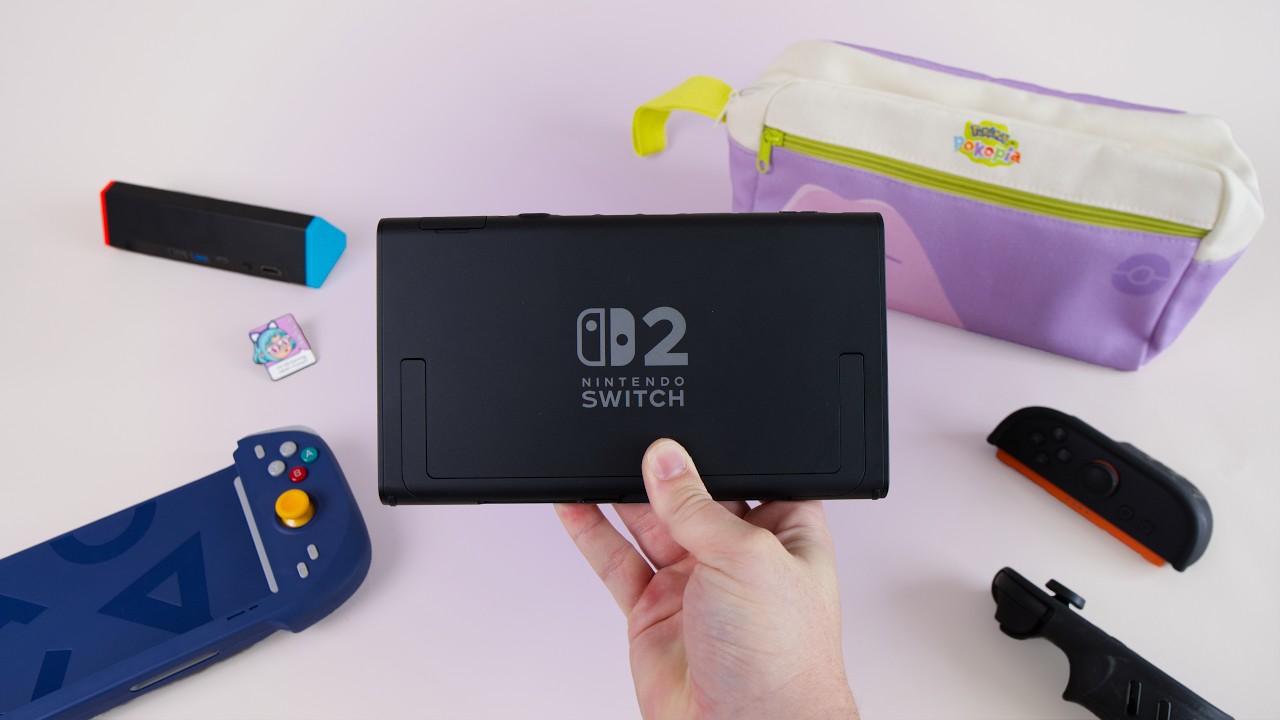
Beyond the Games
Beyond its games, the most fun aspect of the Nintendo Switch and Switch 2 has been the dazzling array of accessories you can pick up to customise the experience. The Switch 2’s form factor leaves the door wide open, and that’s partly because the Joy-Cons aren’t everybody’s cup of tea. It’s easy to be harsh on them, since they’re trying to suit hands from kids to older adults and are unlikely to be comfortable for everyone at once. But there’s also some incredible technology built into the Switch 2’s Joy-Cons, which makes it even harder for third-party accessories to live up to them. They snap on magnetically, they can turn vertically into a mouse mode, and they have some of the best rumble you’re likely to experience in a controller. If you’re willing to replace them or strap something extra on, though, you can get some really cool results.
1. The dbrand Killswitch Case
As a day-one owner of the dbrand Killswitch case, I know this all too well. When it first launched, the grips didn’t fit properly, and some people ended up holding the Switch 2 in one hand only to have it drop out because the connection wasn’t right. To dbrand’s credit, they sent everyone who bought an original case a brand new one, and this version fits much better. Now I can hold the console in one hand, shake it around pretty vigorously, and it won’t fall off. That makes me far more willing to recommend the case.
Once the grips are in, the Switch 2 controllers are so much more comfortable than in their native form, simply because there’s more to hold on to. Generally I really like this case. It’s pretty protective, comfortable, and still gives you that intense Joy-Con rumble. But like any case, there are trade-offs with committing to one form factor, especially if you use other accessories. The biggest issue is the dock. The back plate makes the console too thick for the regular Switch dock, so you have to place a section of the dbrand stand into the dock first and then set the Switch on top. It’s awkward one-handed, it leaves the console sitting taller, and it’s more exposed if you leave it on your TV unit. At first I thought I could live with it, but it annoyed me so much over time that most of the time I take the back plate off entirely, which is easier said than done, apparently, and just use the D-pad and grips.
There’s also a sticker in the box that covers the kickstand. It’s a really nice, comfortable-feeling sticker and you can get away with not using it, but if you swap the case for anything else, the kickstand won’t sit properly and it’s difficult to get the sticker back on, so I abandoned it altogether.
2 and 3. Steering Wheels and the Pro Controller
I also find myself removing the grips all too often, because my son’s favourite Switch game is Mario Kart World. He’s only four and a half, and he absolutely loves the steering wheel controllers. If we aren’t using them, he begs me to pick one up and play it the way he does. The Switch 2 Joy-Cons are longer and bigger than the originals, which makes them a bit harder for a four- or five-year-old to hold. Slide them into Nintendo’s magnetic steering wheel and it becomes a really fun way to play. Mario Kart World also has accessibility features like auto steering and auto weapon use, so he can turn on the gyro, steer like a real controller and have a whale of a time.
Nintendo has made its biggest stride this generation with the Pro Controller. I was a big fan of the original Switch Pro Controller, and it still works with the Switch 2, so you don’t have to throw it away. Mine hasn’t drifted and is going as strong as it has for years. The new Switch 2 Pro Controller builds on it in clear ways. The best feature is the lovely matte plastic on the grips, which feels genuinely premium, and it’s by far the most comfortable controller in my house, including the DualSense and plenty from the likes of GameSir and 8BitDo. The buttons are big and comfortable with just the right travel, the joysticks have a nice wide range of motion, and the D-pad is super responsive. It also has great rumble and two new back buttons for programming, and it can turn on the Switch 2, which the old Pro Controller can’t do. That’s a shame, since Nintendo could surely have pulled it off.
4 and 5. Docks You Can Take With You
Nintendo’s docks and chargers are disappointingly expensive. If you want a spare dock for another room or another house, a second official one costs a good amount of money, which is why third-party companies have stepped in. This is the Antank Switch 2 dock, which is super light and portable and fits easily into most bags, with a little pull-out tray for the console. Antank sent me this dock, so I didn’t buy it myself. I’m staying with relatives in France soon, and it makes a lot of sense to bring the Switch and this dock so we can plug into the TV and play some Mario Kart World with my son and his cousins. The colours don’t exactly match the new Joy-Con colours, but that’s just me being picky. It has the ports you’d expect: USB-C for charging, HDMI, and two USB ports for charging accessories.
Another nice dock that doubles as a charger is VITURE’s Switch dock, which they also sent me as part of my VITURE Beast XR review. It’s the one to use if you own their XR glasses. What’s cool is that you can clip it onto the back of your Switch with a little plate, line up the ports and slide it on, and you have a battery pack that also works as a dock for the glasses. It adds a fair amount of weight, but battery life is one of the Switch’s weaknesses, so a few extra hours is genuinely useful.
6 and 7. A Deck-Style Grip and a Ditto Carry Case
If you want to get away from Joy-Cons altogether, there are deck-style grips like the abxylute N6, where you slide the Switch 2 in and get a much more unibody experience. I reviewed the N6 a while back, but I only had a prototype, the black one. Now I can show you both colour options: a smoky, almost translucent black that won’t draw much attention, and a purple version that harks back to retro gaming with a GameCube-style colourway. There’s little difference between the prototype and the final version. The buttons and joysticks feel much the same, and nothing noticeable has changed other than that you can now buy it in shops. I’ve really enjoyed it. The buttons are high quality, you can program macros onto the back paddles, and little cutouts at the bottom act as an echo chamber for the speakers, making them sound more pronounced. I still have a slight issue with how the Switch 2 juts out at an angle, which feels like an accident waiting to happen, but for playing around the house with something meatier and more deck-style, I can definitely recommend the N6.
Finally, a quick shout-out to a Ditto-themed Pokémon carry case. It isn’t the best case in the world in terms of pockets or build quality, but it’s super cute. There’s a huge Ditto on the back, the human-style companion Ditto on the front, and a really attractive neon yellow nylon interior. It won’t be the most protective, so things may rattle around and get scratched, but there’s a small interior pocket for accessories, and it would happily carry the Antank dock on a trip. I haven’t used it for the Switch much, but it’s been super useful for carrying general tech accessories when I travel, and it’s coming with me to France this week.
This was a pretty rough and ready video, but I wanted to run through these wild and wonderful accessories. Let me know if you’ve tested any of them in the comments.